


Make a deposit
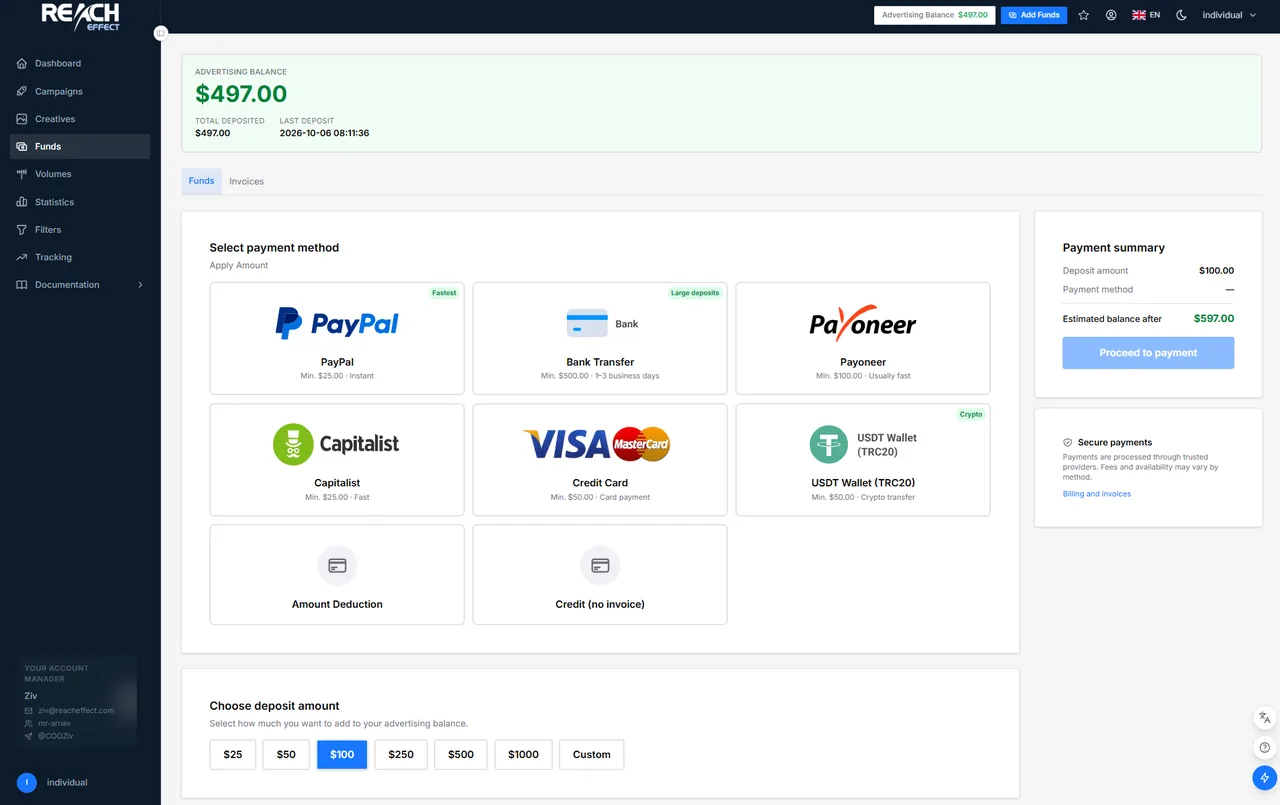
- Open Funds in the sidebar.
- Under Select Payment Method, pick a method. Each tile shows its minimum deposit and speed.
- Choose an amount from the presets or type a custom one, and read the Payment summary: deposit, any provider fee and the balance you will have afterwards.
- Click Proceed to payment. A card form, PayPal window, crypto address with QR code or bank details opens, depending on the method.
- Complete the payment. Instant methods credit within minutes; bank transfers take one to three business days and must carry the reference number shown in the payment window, otherwise matching the transfer to your account is manual.
Payment methods and minimums
| Method | Minimum deposit |
|---|---|
| PayPal | $30 |
| Visa or Mastercard | $50 |
| USDT (TRC20) or Bitcoin | $50 |
| Payoneer or Capitalist | $50 |
| Wire transfer | $50 |
Instant methods credit within minutes; wire transfers take one to three business days. Provider fees, where they apply, are shown in the payment summary before you pay. Bonus or coupon codes, when your account manager issues one, are redeemed in the Redeem Code box on the same page and credit immediately.
Low-balance alert
Switch on Enable low balance alert on the Funds page and set a threshold worth several days of spend. When the balance is empty, the page lists the campaigns waiting for funds so you know what resumes after the top-up.
Transactions and invoices
Every deposit is a transaction with a status: Pending (started, not completed; can be cancelled), Processing (the provider is confirming) or Completed (on your balance). Use Download PDF on a completed transaction to get the invoice. The invoice carries the company details and VAT number from your profile.